PES21_Hook Help

teamCutscenes

Loading different cutscenes for different teams. Customizing players in those cutscenes. Replacing cutscenes with custom cutscenes.

Config

teamCutscenes: 6: coach: id: 65338 name: test outfitType: 0 height: 190 cutsceneCharacters: 0x90033: [65338] 0x90018: [+, +, +, +, +, +, +, +, +, +, 65338, x, x, x] 0x90086: [-8, 65338] 0x90087: [-9, 65338] 0x90088: [-10, 65338] International Cup: # For both home and away if there is no home/away config final: matchMenu: - [0x90015, 0x9000C] - [0x90025, 0x9000C] - [0x90035, 0x9000C] afterGame: # For the final, if the user's team loses, it will use the `afterGame` cutscene of the user's team; if they win, it will use the `final.afterGame` cutscene of the custom cup. If the team loses and no cutscene is set, the default cutscenes will be used. - [0x60001, 0x60002] away: International Cup: # there is an away config for `International Cup`, so it will use this config final: preGame: - [0x10005, 0x10008, 0x10007, 0x1FFFF, 0x10046, 0x10025, 0x10044] 114: coach: id: 65338 outfitType: 12 height: 170 name: test number: 99 placeholderPlayer: - id: 2344 outfitType: 12 - id: 65338 outfitType: 10 - id: 879 outfitType: 10 - id: 101615 outfitType: 10 - id: 45641 outfitType: 10 - id: 63607 outfitType: 10 - id: 113338 outfitType: 10 - id: 40347 outfitType: 10 KONAMI Cup: opening: matchMenu: - [0x90001, 0x90002] dynamicCutscenesRecurrence: false dynamicCutscenes: 0x30000-0x3FFFF: - [+, 0x30130] 0x30002,0x300F7,0x300F8: - [+, 0x300F6] 0x20000-0x2FFFF: - [0x20002, 0x20005, 0x20006, 0x20007, +, 0x20008, 0x20009, 0x2000A, 0x3011C] cutsceneCharacters: 0x90073: [110718, 7511, 65338] 0x90074: [110718, 7511, 65338] 0x900D2: [65338] 0x0007A: [65338, 110718, +, +, +, +, +, +, +, +] 0x9007B: [65338, 110718, +, +, +, +, +, +] home: UEFA EURO: opening: matchMenu: - [0x90018, 0x90035, 0x9003A, 0x9004B, 0x90054, 0x90055, 0x90056, 0x90057, 0x90058] preGame: - [0x10001, 0x90033, 0x90018, 0x9001F, 0x90020, 0x90021, 0x90022, 0x1FFFE, 0x1FFFF, 0x1000E, 0x10017, 0x10046, 0x10044, 0x10030, 0x10028, 0x10043, 0x10035, 0x10037, 0x10038, 0x1003A, 0x1003C, 0x1003E, 0x1003B] halftime: - [0x60001, 0x60002, 0x90033, 0x90034] afterGame: - [0x60010,0x60011, 0x60015, 0x60013, 0x60014] - [0x60010, 0x60013] cutsceneCharacters: 0x90033: [110718] 0x90018: [+, +, +, +, +, +, +, +, +, +, 65338, x, x, x] away: UEFA EURO: opening: preGame: - [0x10001, 0x90033, 0x90018, 0x9001F, 0x90020, 0x90021, 0x90022, 0x1FFFE, 0x1FFFF, 0x1000E, 0x10017, 0x10046, 0x10044, 0x10030, 0x10028, 0x10043, 0x10035, 0x10037, 0x10038, 0x1003A, 0x1003C, 0x1003E, 0x1003B] halftime: - [0x60001, 0x60002, 0x90033, 0x90034] afterGame: - [0x60010, 0x60011, 0x60012, 0x60013, 0x60014, 0x60015, 0x70041] - [0x60010, 0x60014] cutsceneCharacters: 0x90033: [110718] 0x90018: [-11, -12, -13, -14, -15, -16, -17, -18, -19, -20, 65338, x, x, x]

Overall

There are 4 parts, and I'm listing the details for each part separately. We'll skip the {TEAM_ID} section, all the configuration parts below are targeted at a specific team and serve as sub-configurations for {TEAM_ID}.

Part 1: Set different cutscenes for different cup competitions

Config Key

Value

Description

{CUP_NAME}

Object

In {CUP_NAME}, if the team controlled by the user is {TEAM_ID}, then use the config in this Object.

Example

teamCutscenes: 6: International Cup: final: matchMenu: - [0x90015, 0x9000C] - [0x90025, 0x9000C] - [0x90035, 0x9000C] afterGame: - [0x60001, 0x60002]

Annotation

This means that in the International Cup, if the match is final and the team controlled by the user is 6, the matchMenu cutscene will be used randomly from the 3 arrays, and the only one afterGame cutscene will be used.

Part 2: Dynamic cutscenes - Replacing certain cutscenes with custom cutscenes

Config Key

Value

Description

dynamicCutscenes

Object:


{MATCHING_RULE}: [ TARGET_PATTERN_ARRAY ]

Replacing original cutscenes with custom cutscenes. Such as adding a coach cutscene after a player receives a yellow card.

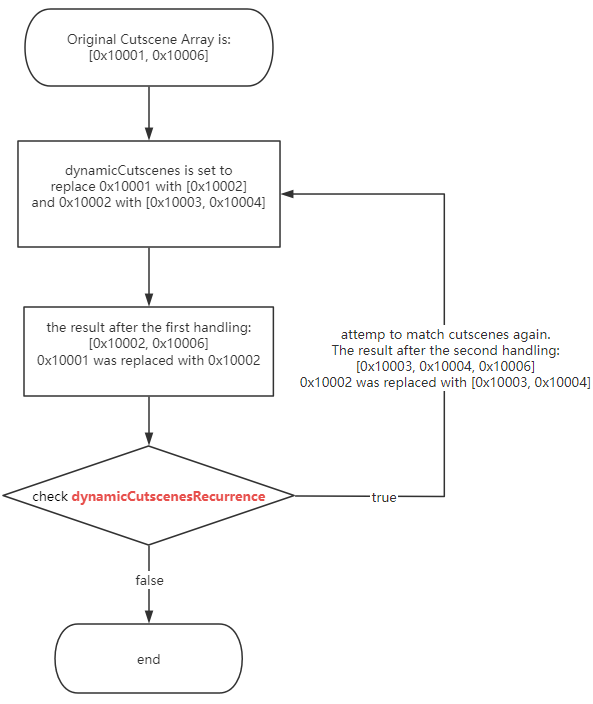
dynamicCutscenesRecurrence

true/false

Whether to recursively attempt to match cutscenes; if not configured, the default value is false.

Team cutscenes dynamic cutscenes recurrence

Example

teamCutscenes: 114: dynamicCutscenesRecurrence: false dynamicCutscenes: 0x30001: - [+, 0x30130] 0x30002,0x300F7,0x300F8: - [+, 0x300F6] 0x20000-0x2FFFF: - [0x20002, +, 0x3011C]

Annotation

As you can see, there are three ways to set dynamicCutscenes.

  1. 0x30001: a single cutscene id, means that the original cutscene 0x30001 will be replaced with the custom cutscenes.

  2. 0x30002,0x300F7,0x300F8: multiple cutscene ids, means that the original cutscenes 0x30002, 0x300F7, and 0x300F8 will be replaced with the custom cutscenes.

  3. 0x20000-0x2FFFF: range of cutscene ids, means that the original cutscenes 0x20000 to 0x2FFFF will be replaced with the custom cutscenes.

Part 3: Custom characters in cutscenes

Config Key

Value

Description

cutsceneCharacters

Object:


{CUTSCENE_ID}: [ PLAYER_ID_OR_INDEX_ARRAY ]

Setting the characters in cutscenes.

placeholderPlayer

Array: Placeholder Player Array


Placeholder Player & Coach Structure

This is used to add any player who is not on the team for reference in cutsceneCharacters via face ID. It is also used to assign a specific type of clothing to a particular player on the team.

coach

Object: Placeholder Player


Placeholder Player & Coach Structure

The same as above 👆, adding a placeholder player as the coach. This is the same as adding a player in placeholderPlayer.

Placeholder Player & Coach Structure

Config Key

Value

Description

id

Number - Required

Face ID

name

String - Optional

Player Name; the default value is an empty string if not set.

number

Number - Optional

Jersey Number; the default value is 0 if not set.

height

Number (cm) - Optional

Player Height; the default value is 180 if not set.

outfitType

Number - Optional

See Outfit Type Values; the default value is {TEAM_UNIFORM} if not set.

isGK

true/false - Optional

Indicates whether the player is a goalkeeper, used to determine if they wear Player or GK uniform; the default value is false if not set.

For example:

teamCutscenes: 6: coach: id: 65338 name: Kevin outfitType: 19 height: 190 placeholderPlayer: - id: 2344 name: James number: 6 height: 205 outfitType: 21 - id: 879 name: Potter outfitType: 24 cutsceneCharacters: 0x90033: [65338] 0x90018: [+, 2344, +, +, +, +, +, +, +, +, 65338, x, x, x] 0x90073: [0, -9, 65338]

Annotation

  1. We have added a coach (ID: 65338) and two players (ID: 2344 and 879) in placeholderPlayer. So there are three external characters that can be used in cutscenes.

  2. In cutsceneCharacters, we have assigned characters for 3 cutscenes.

    1. 0x90033: [65338]

    2. 0x90018: [+, 2344, +, +, +, +, +, +, +, +, 65338, x, x, x]

    3. 0x90073: [0, -9, 65338]

Part 4: Home & Away configs

In some cases, you may want the team you are controlling to have different cutscenes when playing at home and away, or to use different characters in a cutscene. The part 4 allows you to configure the contents of the previous 3 parts separately for home and away matches.

Config Key

Value

Description

*

Object

Config for both home and away.

home.*

Object

Config for when your controlled team is playing at home.

away.*

Object

Config for when your controlled team is playing away.

Example

teamCutscenes: 6: cutsceneCharacters: 0x90033: [65338] International Cup: final: afterGame: - [0x60001, 0x60002] home: # Config for when your controlled team is playing at home. coach: id: 65338 name: test outfitType: 21 height: 190 International Cup: final: afterGame: - [0x60003, 0x60004] away: # Config for when your controlled team is playing away. coach: id: 65338 name: test outfitType: 20 height: 190

Annotation

As you can see, this configuration includes 3 types: general for both home and away, home-specific, and away-specific.

For any configuration, PES_Hook will attempt to use the one with the finer scope. For example, when your team is playing at home, it will prioritize reading the configuration from home.*; if that does not exist, it will then try reading the general configuration.

Setting Team Cutscenes for Exhibition Mode

teamCutscenes: 12: # Team ID normalMatch: # Exhibition Mode preGame: - [0x90086, 0x90087] International Cup: # Cup Mode, a specific cup final: afterGame: - [0x60001, 0x60002]

Similar to setting cutscenes for cup competitions, you can directly use normalMatch.

Additional

Available Cups

Cup Names

Available Stages

Competition Stages

Available Time Points

Time Points

Outfit Types

Outfit Type Values

Old Version of the Usage PDF

It includes two simple flowcharts.

teamCutscenes.pdf

Last modified: 02 十二月 2024